
IPTV M3U Playlist Guide — URLs, Formats & Integration
Read our expert walkthrough to master modern internet television, optimize your IPTV Testline, and unlock flawless 4K entertainment.
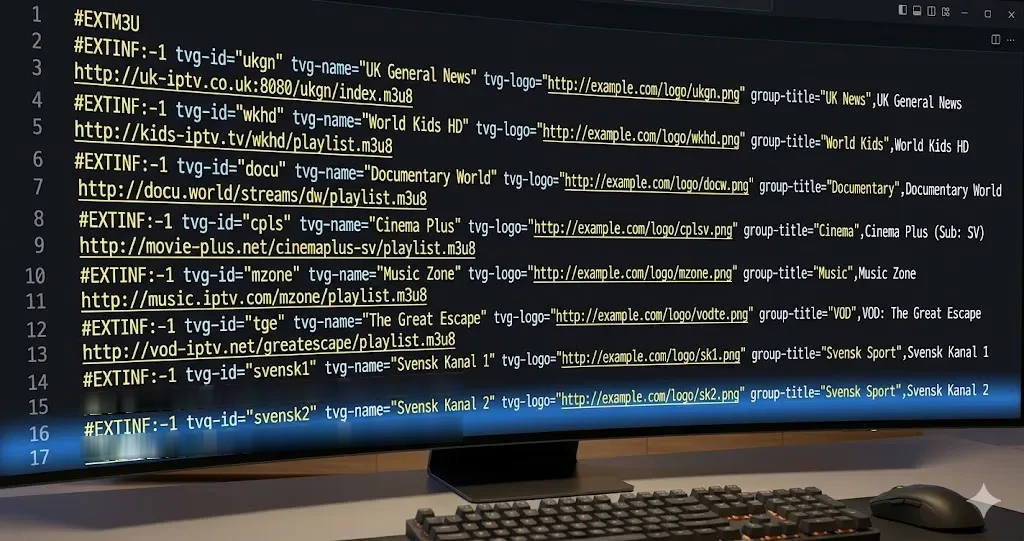
Mastering the Universal Streaming Format: M3U Playlists
The M3U playlist format is the foundational standard that connects streaming applications to live broadcast servers. When you receive your IPTV Testline credentials, you are provided with an M3U Plus URL that links your player to our global content delivery network.
Anatomy of an M3U8 Playlist File
An M3U playlist contains structured metadata lines that instruct your player how to display and stream each channel:
#EXTM3U
#EXTINF:-1 tvg-id="ARD.de" tvg-name="ARD HD" tvg-logo="http://.../ard.png" group-title="Germany",Das Erste HD
http://server.domain:port/live/username/password/12345.m3u8
The tvg-id tag automatically links the channel to our electronic program guide, while group-title organizes channels into neat categories like 'Germany', 'Sports', or 'Cinema'.
How to Load an M3U URL into Your Player
- Open your player app (e.g., IPTV Smarters, TiviMate, or VLC).
- Choose 'Add Playlist via URL'.
- Paste the M3U link provided by our WhatsApp support team and assign a playlist name.
- Click 'Save' and allow the player to download channels and TV guide information.
Ready to Experience Premium IPTV?
Enjoy 40,000+ live channels in 4K, live Bundesliga coverage, and 120,000+ VOD movies with instant 5-minute activation on WhatsApp.
Order via WhatsApp 🟢